Labels
BASS
(50)
COMPRESSION
(32)
DRUMS
(45)
EFFECTS
(49)
EQUALIZATION
(30)
GUITAR
(112)
HOME RECORDING
(95)
IMPULSES
(21)
INTERVIEWS
(19)
KARAOKE
(1)
LIVE
(10)
MASTERING
(61)
MIDI
(21)
MIXING
(179)
REVIEWS
(156)
SAMPLES
(69)
SONGWRITING
(19)
SYNTH
(3)
VOCALS
(31)
Sunday, April 17, 2016
Quad Tracking Guitars (a guide for dummies)
Hello and welcome to this week's article!
Today we will talk about an interesting topic concerning guitar recording: quad tracking.
Quad tracking is a technique in which you layer four guitar takes doing the exact same thing in order to increase the wall of sound; this is particularly useful in genres in which the guitar player doesn't need to do particularly articulated riffs, like nu metal or metalcore, and in which the impact is the most important aspect.
There are situations in which this technique is not suggested, such as the bands in which the riffing is particularly fast and precise (therefore the result, unless the guitarists are exceptionally good, can be unpleasantly "hazy"), or when the sound is too crowded, for example when there's an orchestra, or many backing vocals part; this is a technique purely conceived for guitar oriented music in which the musicians wants to maximize the impact.
How to do it: there are many different solutions to try if we want to quad track a guitar part.
First off we need to record the part in four different takes, otherwise just taking one single take and copying it four times would only result in an increase of its volume, and we would lose the layering effect that creates the wall of sound.
Then we would need to spatially place the takes using the PAN knob: we could put the external guitars pretty wide, for example 90% left and 90% right, and the other 2 closer, for example 50% left and 50% right, but there is no fixed rule: someone prefers to keep the internal ones a bit farther away (like 80%), someone else prefers to keep them a bit closer to the center (like 25%), it really depends on how crowded is the centre of your mix.
Now it's time to listen to the four tracks playing together: are we satisfied of the result? Or maybe now the guitar wall of sound is too predominant in the mix?
If the latter we must obviously lower the volume until it's perfectly balanced, but we can also try to equalize our guitars differently, in a creative way: we could for example try to retain some of the low end in the tracks closer to the center and try to focus the more external tracks on the mids and highs: this could bring the mix to a less dense guitar parts, mantaining the layering effect typical of the quad tracking.
Another technique to make the sound fuller is to use an amp (or amp simulator) for the most external tracks and a different one for the internal ones.
Do you have other interesting quad tracking tips? Let us know in the comment section!
Become fan of this blog on Facebook! Share it and contact us to collaborate!!
Saturday, April 9, 2016
Guitar and bass Tuners! All the different types (with a free one inside!).
Today we will talk about a topic that is often overlooked:
Guitar and bass tuners!
A tuner is a device that takes the sound of our strings and determines the pitch, and then tells us what note it is, or how to adjust the tuning until we reach exactly the note we need.
Unless we have an absolute ear that lets us determine with perfect precision what note is our string and how to correct it, we absolutely need a tuner.
There are different types of tuner, but they all do the same job: help us in finding the right pitch for our strings. Let's check them out:
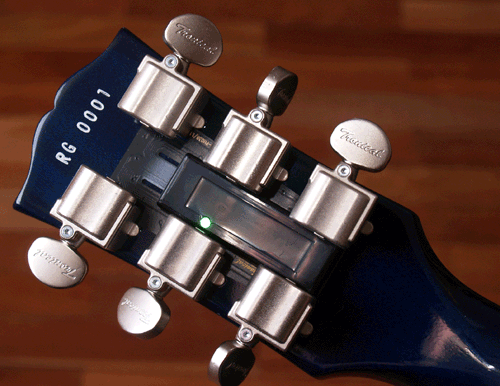
- Compact tuners: these are the most common, and can be both digital (like this one depicted above), or analog (like the one in the picture on top). They can usually receive the sound via jack input, or with an in-built microphone (this one is used to tune acoustic instruments).
- Clip Tuners: these gets attached to the guitar headstock with a clip, and they determine the pitch of the string played using the vibrations on the wood. This is the most compact and lightweight tuner of all, but sometimes it is a bit less accurate than the others, imho.
- Acoustic guitar in built tuner: many recent acoustic guitars feature a small tuner built within the body itself of the guitar, and it is usually paired with a pickup that lets us plug the acoustic guitar into an amp with a jack.
- Stompbox tuner: one of the most classic tuners of all, this one lets us mute the guitar while tuning on stage and it's particularly bright to be seen also in dim light conditions. The best ones are "true bypass", which means that doesn't deteriorate the guitar signal passing through them.
- Vst tuners: today many daw offer a vst tuner, in order to tune our instruments plugged into the audio interface. You can download for example GVST GTune, a good free vst tuner (with also the Hertz calibration, so that if you don't want to tune with the A at 440hz you can modify it, for example at 432hz).
These are the most used technologies so far.
Lately there have been attempt of simplifying the tuning system, but not always they turned out to be succesful:
Gibson experimented the Les Paul Robot, a guitar that can tune iself due to motorized locking tuners, but it didn't have much success due to its extremely high price and the fact that the technology was very fragile, and Peavey presented the Peavey AT serie, that uses a form of Autotune in order to digitally correct the tuning of the strings.
The downside of this technology is the fact that the strings actually remains out of tune, only the output pitch is digitally corrected, therefore the result is that after a while the string will have, even if it sounds in tune, a weird tension.Our hope is, looking at it by a real utility point of view, that someday every amp will have a small in built tuner, because that would be really useful and make the guitar and bass player's life easier.
Become fan of this blog on Facebook! Share it and contact us to collaborate!!
Saturday, April 2, 2016
How does compression work (with practical cases)
Hello and welcome to this week's article!
Today we will try to understand how compression work, in a much deeper level than how we've seen before, because the idea is to stop using presets as much as we can, and to do every step of sound sculpting - mixing with a purpose, with the complete awareness and control of what we are doing.
As we can see in the image, that wave (let's imagine it's a snare hit), can be divided in four different moments:
A - Attack: the beginning of the hit, that rises up to the peak of the sound
D - Decay: the initial lowering of from the highest peak to the body of the sound
S - Sustain: a part of the sound (which we can consider the "body") in which the volume remains more or less constant for a certain amount of time
R - Release: the final decay of the sound from the sustain part to the silence
Let's now consider also the four most common controls we have in a compressor:
Attack, Release, Ratio and Make Up gain.
Attack: how fast, when a sound surpasses a certain threshold, the compressor kicks in
Release: how fast the gain reduction goes back to zero
Ratio: how strong the gain reduction must be. If 2:1 means that for every 2db that surpass the threshold, the compressor make them sound as loud as 1db.
Make up gain: helps us keeping the overall level of the sound comparable to its unprocessed version, so we can turn it up or down until it sits well again in the mix,
Practical applications: In order to use compression properly we need to ask ourseves the reason why we should add it to our channel insert (and if there is no good reason, we just shouldn't): does our track need more attack? Does out track need less attack and more body? Does our track need some dynamic control? Here are some examples of practical use of a compressor:
- We need more body on our snare: we can dial in our compressor the attack to be fast, and to find a ratio that reduces the attack part of our wave of some db, so that it is comparable to the sustain part: this way the quieter parts of the sound (namely the sustain and the release) have more headroom to be raised in level, and therefore the snare sound will have a quieter initial crack, but a much longer and fatter body. So by squashing the attack, we increase our sustain.
- We need to give more attack to our bass: if we want to raise the attack on our bass (for example to make the sound of the fingers on the strings to pop out more), what we need is to turn down the sustain part of the sound, so that the attack remains high, and then we raise the overall level with the makeup gain. How do we lower the sustain part? by turning the release on our compressor down. So, by squashing the sustain, we increase our attack.
- We need to make a vocal track with a high dynamic range even: if we have a song in which the vocals have some part in which it's just a whisper and other in which the singer yells from the top of his lungs, we have a huge dynamic range, and we need each part to be audible the same.
First off when tracking, it's important to set the gain properly according to the loudness of the part (adjusting the input knob in order to reduce the dynamic range a bit), then in the project preparation phase we could do some volume automation to reduce further the dynamic range before starting compressing, so that the compression will be less aggressive in evening out the levels, and finally we can compress, using a fast attack and adjusting the ratio in order to tame the peaks and let the quieter parts to be audible as all the rest.
As we have seen the approach that needs to be understood in order to use compression properly is a REVERSE APPROACH: do we need to boost the sustain because compared to the attack it is too low? We lower the attack and raise the level of the whole wave, instead of trying to raise the sustain part to match it with the attack part.
Become fan of this blog on Facebook! Share it and contact us to collaborate!!
Saturday, March 26, 2016
How to set the intonation of a guitar or a bass (a guide for dummies)
Hello and welcome to this week's article!
Today we're going to talk about how to set the intonation of a guitar or bass with Tune o'Matic fixed bridge.
First off, before setting the intonation, we need to have the neck of our guitar straight and the action perfectly set, click here for a dedicated article.
Tune o' Matic is one of the most common types of fixed bridge that can be found on a guitar or a bass, and it comes in many variants, some with a tailpiece, and some without.
This type of bridge was created in the early '50s by Gibson guitars, and still today it is considered a standard, and it is produced by many manufacturers due to its stability and versatility in fine tuning the intonation.
What do we mean with "setting the intonation of a guitar?"
Guitars comes in different neck lenghts, different numbers of frets, and players can choose among different gauges of strings, and all these variables can affect the intonation, which means that even if we tune a string to be a certain note, sometimes if we play the same string at the 12th fret (which should be exactly the same note) the tuning up there may result off, and sometimes this variation gets even to the point of becoming a different note.
The Tune o'Matic bridge (and its clones) comes in our aid with its brilliant engineering: it's a serie of saddles (one for each string), which can be adjusted individually with a screw.
What is the purpose of using a screw on this saddles?
To increase or decrease of some millimeter the distance between the nut and the bridge (technically the saddle, the part of the bridge that touches the string).
If the string is perfectly tuned, for example in E, and at the 12th fret the note is a bit too high, we can make the distance between the nut and the saddle a little longer, and this will lower the 12th fret pitch.
If it is still not enough, it's also possible to turn the orientation of the saddle backwards to gain some extra millimeter (if the saddle type allows this).
If instead the pitch at the 12th fret is too low compared to the tuning of the open string we can make the distance between the nut and the saddle a little shorter.
Keep in mind that this intonation cannot make miracles, so if the tuning is too low for the neck lenght it's almost impossible to make the pitch perfect, so we must sometimes settle with being close, but not nailing it completely.
A solution could be switching to a thicker string gauge, and if not even this is enough, maybe we should consider buying a guitar with a longer neck, like a baritone one.
Now, to have the the perfect guitar we need to move to the final step: to set the perfect pickup height! (click here for a dedicated article).
Become fan of this blog on Facebook! Share it and contact us to collaborate!!
Saturday, March 19, 2016
Review: Toneforge Menace
Hello and welcome to this week's article!
Today we're going to review a very interesting plugin: a guitar amp simulator designed from one of the most productive rock-metal mix engineers in the scene: Joey Sturgis!
Menace is a guitar amp simulator particularly interesting, which is composed by a signal chain, in which the single elements are bypassable: Pedal (which is a Tube Screamer emulation), Amp, Cab, Magic (which is a post-processing created by the producer), Eq (an emulation of a mixer channel parametric eq to fine tune the tone), Limiter (an emulation of a peak limiter).
The Cab section contains the simulation of four microphones: Condenser, Sennheiser Md421, Shure Sm57 on and off axis), while the parametric equalizer splits the signal in five bands (lows, lower mids, mids, high mids and highs), letting us dial in our tone in a very precise way.
The Limiter module is not very common in an amp modeler, especially with this interface that looks like an emulation of a Teletronix La-2a Leveling Amplifier, since the trend lately is to compress the high gain guitar sound usually only in the low mid area, just to tame the dynamics of the palm muting. The result is that limiting the whole track has also a tone shaping effect, that makes the sound even more aggressive (obviously the risk of overdoing is always behind the corner though, so use it with caution).
What makes this plugin different from the many other competitors both in the free and paid market?
Well, while the interface of this plugin is pretty common (a simple signal chain with built in overdrive, noise gate, amp and cab section), this "Menace" comes with a few goodies that the others don't have.
First off the tone is right away very euphonic: the midrange is very musical, and the sound is pretty much mix ready without any tweaking.
The built in parametric equalizer does a good job in filtering out unwanted resonances, avoiding us to load an additional eq on the channel, and the peak limiter keeps the dynamics stable: basically this could be the only plugin you would need for your rhythm guitar insert (unless you need effects).
Interesting also the "Joey's Magic" funcion, which applies some eq and processing made by Joey Sturgis, and that helps the sound poking furthermore through the mix.
This plugin is said to be the first of many others, both for guitar and bass, that will help producers in having an usable, cpu lightweight tone right away, and as a first step from Toneforge I must say they have pretty much nailed the purpose.
We'll be waiting for a good bass amp simulator and other expansions, keep up with the good work!
Specs taken from the website:
- Built in noise gate
- 5 bands parametric eq
- Built in leveling amplifier
- Cab simulator with 4 microphones modeled
- Fully automatable parameters (Vst3 version)
- Each module is bypassable
- Additional Joey Sturgis processing that can be enabled or disabled
- 32 bit and 64 bit, Vst2 and Vst3 version
Saturday, March 12, 2016
Review: Ignite Amps PTEq-X
Hello and welcome to this week's article!
This time we're going to review an amazing free eq Vst plugin: Ignite Amps PTEq-X.
Ignite Amps is a company made by two italian engineers who both design free hi quality vst plugins and build physical hardware devices, such as guitar and bass preamps and stompboxes.
This time they created an equalizer based on the legendary Pultec EQP-1A (click here for an article about the story and the characteristics of this device), one of the most famous hardware equalized ever produced, still sold today after 65 years of carreer.
The plugin not only models the hardware device, but it extends its possibilities by letting us not only dial the low and high frequences, but also adding two extra "rack" units: one (based on the MEQ-5) dedicated to the mid frequences, with two bells set in different ranges, and another one with a high cut and a low cut filter (based on the HLF 3C), both of them with more frequences to choose from, compared to the original models.
Basically the controllable areas are now six, summing up the three modules, making this plugin flexible enough to satisfy most of the uses also in a modern studio.
The three modules are independently bypassable, and there is also a switch to choose between four types of tubes, made to add a different tone coloring,
Additional controls are an input and an output control, and a mono-stereo switch, that makes this plugin ideal both for mixing single mono tracks and for buss mixing and mastering.
The plugin is lightweight, stable and comes both in 32bit and 64bit version; a big thumbs-up for the Ignite guys, keep up with the good work and we hope to see more and more quality products in the future!
Specs taken from the Ignite Facebook page:
- Three different equalization modules with perfectly analog curve response even at highest frequencies
- Ignite Amps 3rd generation triode stage analog modeling for 4 different tube types
- Additional selectable frequencies for the PEQ1A model, compared to the original design
- Refined filters frequency precision for the MQ5 and H3C models, compared to the original design
- Switchable equalizers and tube stage modeling for better CPU usage management
- Switchable linear phase oversampling for aliasing reduction
- Global input / output level controls
- Mono / Stereo processing support
- Double precision (64 bit) floating point mathematical tube models
- Fully automatable controls
- Ignite Amps proprietary preset management system with bank file import/export functions
You can download the plugin for free by Clicking Here.
Become fan of this blog on Facebook! Share it and contact us to collaborate!!
Saturday, March 5, 2016
Pultec and the other Parametric Equalizers: a guide with Free Vst Plugins
Hello everyone and welcome to this week's article!
Today we will say something about the history of Equalization, in a way similar to the one we did for Compression.
An equalizer, as we have already seen, is a tool that allows us to boost or cut a certain frequency area. In the case of a Graphic equalizer you have the frequency range divided in "slices" and you can raise or lower the single band, and this system is used usually for the whole track.
A parametric equalizer instead lets you decide with one knob the frequency area to cut or boost, with another knob the amount of db to add or subtract, and with a last knob how narrow the cut or boost should be.
This kind of eq is used both for mixing the single tracks, and for mastering.
The story of equalization starts around 1920, and it was made mainly to process the voice of a radio host; equalizers were initially tube driven, then, the more mainstream they became, the more the analog version became popular, to the point that around 60s and 70s every mixing console had a separate analog parametric eq section for each track.
Around the '90s the rack eq became back popular, and today we can choose among tube driven, analog and digital eq, in passive (so just made to filter out frequences) or active version.
All this different versions in the market are made to produce different results: a tube eq will give to the mix a certain amount of harmonic enhancement, an analog eq will have a certain sonic property that can be heard in almost every record of the 70s (a very subtle saturation and a certain eq cut), while a digital eq has the undeniable advatage to let us sometimes see graphically (with a spectrum analizer).
The spectrum analizer has been a revolutionary tool: it lets you see the actual wave and to operate surgically in the specific frequences with great precision, letting you using not only your ears, but also your eyes.
Today we have Vst emulations of all kinds of hardware eq, and especially lately we are starting to see again the arrival in the market (both free and paid) of vintage parametric equalizers, with pieces of software that tries to recreate not only the way those processors used to work, but also the collateral properties, as the saturation, for example.
Usually parametric equalizers have one gain knob that at unity position leaves the signal unaltered, and if you turn it up or down it adds or subtracts dbs in the assigned frequency area, but there is a very particular hardware processor, called Pultec EQP-1A that works differently (see picture above).
This equalizer, lauched originally in 1951, is one of the most used of all times in the music industry, and its latest incarnation is still on sale today.
The original Pultec is a tube eq which has the particularity to have for each one of the 2 bands, 2 gain knob: one for the amount of boost to apply and one for the amount of attenuation.Said this way it sounds like those two knobs cancels out each other, but the truth is that the two knobs which works in the same frequency range doesn't actually affect exactly the same identical frequences: the attenuation in facts happens in a slighly higher area than the boost, and this makes possible to achieve an attenuation that has for example a boost in the area before the slope starts.
Is it also possible to control the Q, which is how narrow is the boost or cut.
Why to choose today a Vst that emulates an old piece of hardware with very limited controls like the Pultec instead of using a very flexible new Vst equalizer, with a lot of functions and a built in spectrum analizer?
Because often, if the programmers are good, it recreates the coloring that this device used to give to the tracks, and because it forces you also to use softer settings, which leads to less drastic and surgical changes in the sound, leaving a more natural result which is proper of the '60s and '70s records.
My suggestion is to give it a shot and decide with your ears.
Here's 2 versions, one free and one paid of the Pultec EQP-1A Vst emulations:
Ik Multimedia Vintage Equalizer (paid)
Ignite Amps PTE-Qx
Become fan of this blog on Facebook! Share it and contact us to collaborate!!
Subscribe to:
Posts (Atom)